

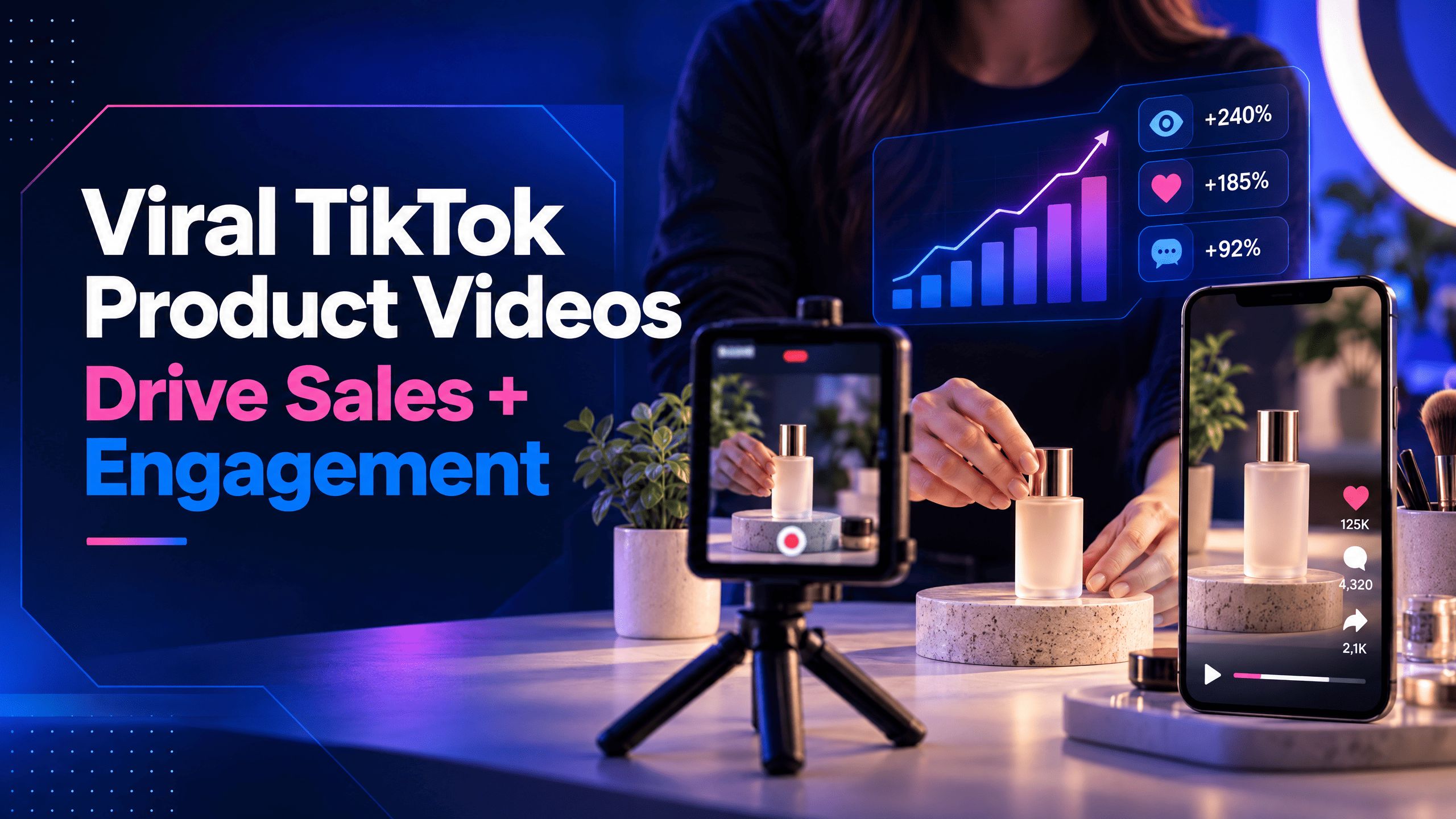
Learn how to plan, film, and edit TikTok product videos with clear hooks, useful demonstrations, and practical ideas you can adapt from one shoot.
Views feel good, but they don’t translate to sales.
A product video can attract attention and still leave potential customers unsure what the product does, why they need it, or how to buy it.
The difference often comes down to how the video is structured. A strong opening earns attention, a clear demonstration gives viewers a reason to trust the product, and a relevant call to action helps them decide what to do next.
This guide covers practical TikTok product video ideas, how to plan and edit a video, and how to reuse footage to explore different creative approaches without filming everything from scratch.
Let’s begin.
Table of Contents
Key Takeaways
- A viral TikTok video with hundreds of thousands of views can still sell almost nothing if it never gets to the point, so TikTok product video ideas need to be built around conversion, not just watch count.
- TikTok’s algorithm rewards attention, watch time, rewatches, comments, and saves, which means a video’s early seconds matter more here than on almost any other platform.
- Shoppers on TikTok often buy things they weren’t planning to, which makes the platform a discovery engine.
- E-commerce video marketing works best when it feels like a recommendation rather than an ad.
What Makes a TikTok Product Video Effective?
You should consider having a TikTok product video because:
The Algorithm Rewards Attention, Not Just Reach
TikTok tests a new video with a small slice of its audience first.
How that small group responds- whether they watch the whole thing, rewatch it, comment, or save it- decides whether the video gets shown to more people or quietly stops appearing.
This is why a small account can outperform a big one.
In WayaFrame’s analysis of 3,012 TikTok videos, micro-creators (under 10,000 followers) averaged 377 views per follower, while creators with over 100,000 followers averaged 5.6. About 22.3% of micro-creator videos reached 1,000 times their follower count, against 0.2% for large accounts.
This is the reason a TikTok product video idea has to be built around holding someone’s attention in the first 2 seconds, not around having a bigger budget or more followers than the next seller.
Shoppers Expect to Feel Something Before They Buy
About 77% of TikTok users say the app has led them to buy something they had no plan to purchase before scrolling past it.
That’s a different kind of buying trigger compared to a search ad someone clicked while actively looking for a product, or a static photo sitting on a website waiting to be found.
Speed Is Part of the Strategy
Trends on TikTok move in hours, sometimes less, not weeks.
A product video idea that takes three or four days to actually film and edit is often irrelevant by the time it’s finally ready to post.
This is where a fast, short-form-focused editing workflow starts to matter as much as the creative idea itself.
How to Plan and Edit a TikTok Product Video
Before you start editing, decide what the viewer should understand by the end. Choose one product benefit or question to focus on, then build a short sequence of shots that demonstrates it.
1. Choose one message for the video
Trying to explain every feature in one short video can make the result hard to follow.
Pick one useful angle: a problem the product addresses, a detail that makes it different, how it works, or what arrives in the package.
For example, a reusable water bottle product video could be presented through different angles:
- Convenience: show how it fits into a bag or cup holder.
- Cleaning: demonstrate how its parts come apart and go back together.
- Everyday use: show it being filled, carried, and used during a normal day.
Choose the angle that you can demonstrate honestly with the product you have. Avoid promises that the footage cannot substantiate.
2. Write a hook that sets up the demonstration
The opening should give viewers a reason to stay without making a claim the video cannot prove. A useful hook can introduce a common frustration, pose a specific question, or preview the detail you are about to show.
Examples for a reusable bottle:
- “Will this fit in a standard cup holder?”
- “Here is how the lid comes apart for cleaning.”
- “What fits inside my everyday bag?”
These openings work as prompts for a demonstration, not as guarantees of performance. Put the key phrase on screen if it helps viewers understand the premise with the sound off. Keep text brief and make sure it does not cover the product or an important action.
However, if you’re out of attention-grabbing hook ideas, you can utilise WayaFrame’s AI video script writer to write your hook.
- On your library interface, click on “AI generate” and select the “Script” option.
- Type your hook prompt. For our reusable water bottle product video, the input prompt below works best.
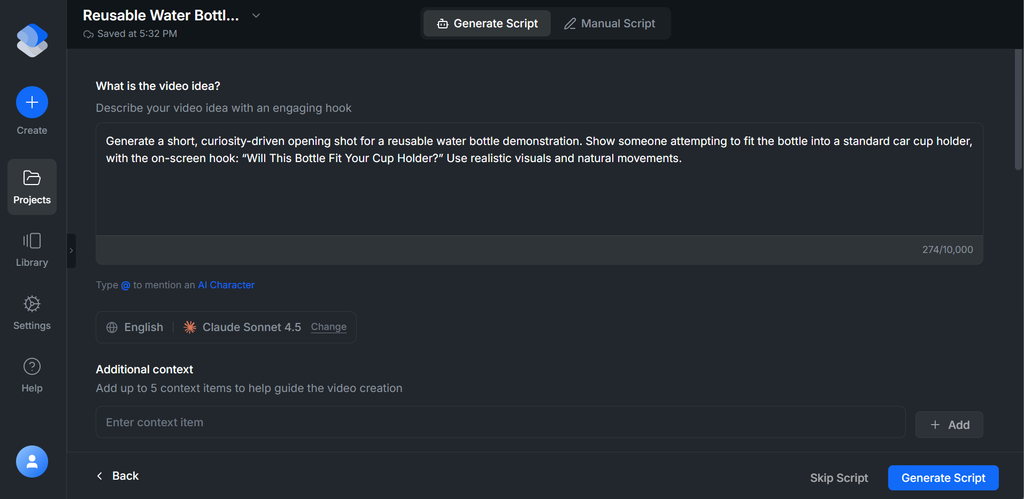
Before you click the “Generate Script” button, fill out the options below that give your hook direction:
- Your hook language
- AI generation model
- Additional context
- Video tone & emotions
Scroll back up to view your generated hook for your product video.
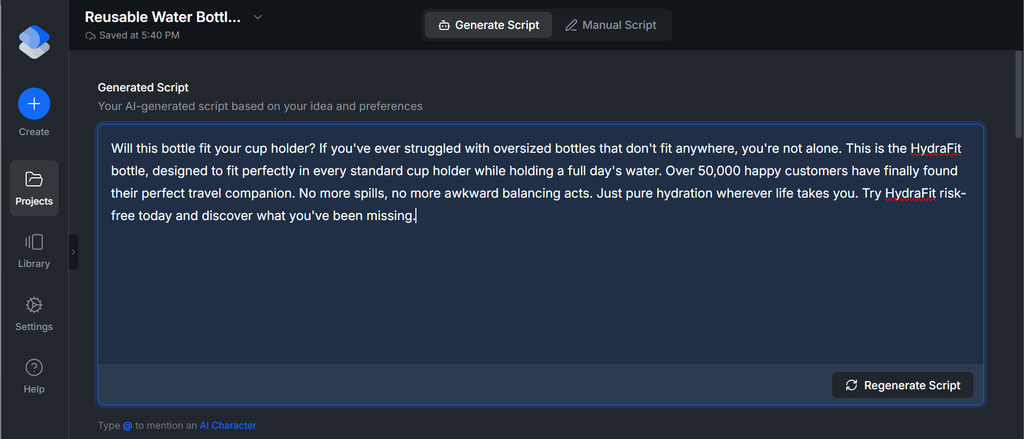
If you like the script, move on to the video, and if you don’t, click on regenerate or highlight specific text or paragraph to edit.
3. Plan shots that prove the point
A simple shot list can make filming more efficient and editing easier. For a short product demo, you might capture:
- An opening shot that introduces the question or product.
- A close-up of the relevant feature or detail.
- A wider shot showing the product in a realistic context.
- A final shot that answers the opening question or shows the next step.
Use clear lighting and steady framing where possible. If the product’s size, texture, setup, or result matters to the decision, show it accurately. Do not use edits or visual effects that imply a result the product does not deliver.
Further, creating this product video manually can be overwhelming, especially if you aren’t creative-inclined. However, WayaFrame’s video clip generator can be your life saver at this point.
In addition to the script it generated previously, you can, from that same interface, generate your product video. This means WayaFrame doesn’t just give you a script and let you figure out how to bring it to life, perhaps using another platform or tool.
In contrast, it’s a complete AI video workspace that gives you a comprehensive dashboard of valuable tools for creating your product video.
- To generate your product clip, click on “Continue to Voice”. This is where you select your preferred voice before creating your clip.
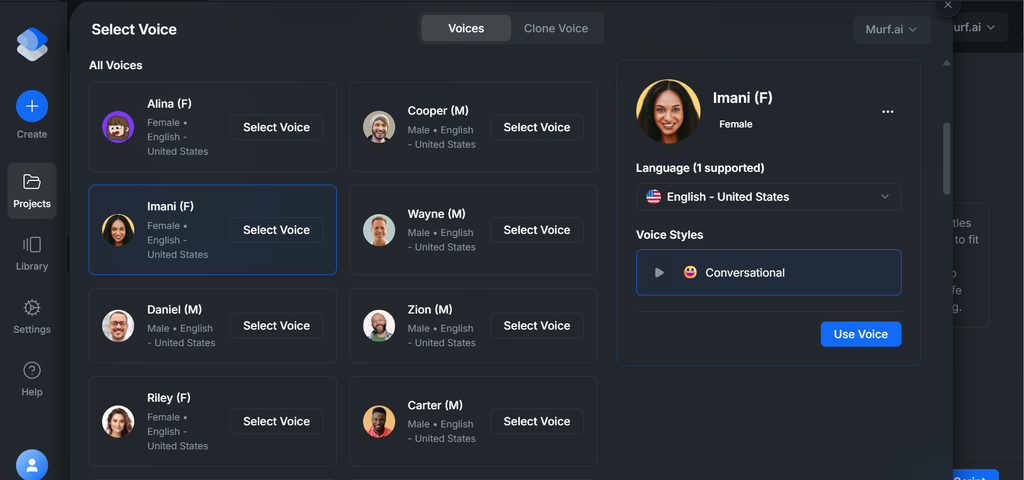
- This is the voice the clip generator will use to flesh out your script. Click on “Insert Voice” and have it previewed. You could also highlight the script text to make changes to the voice or script.
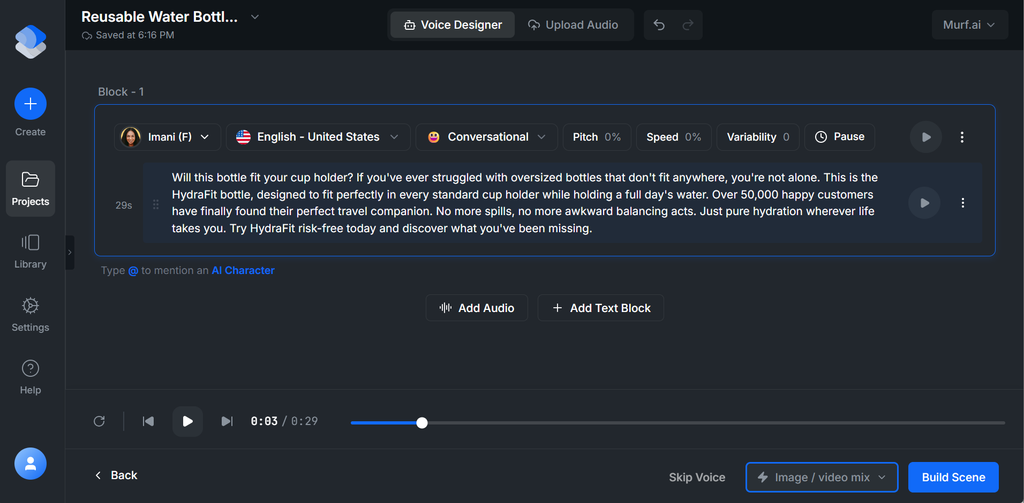
- Next, click on “Build Scene” and have your product video created.
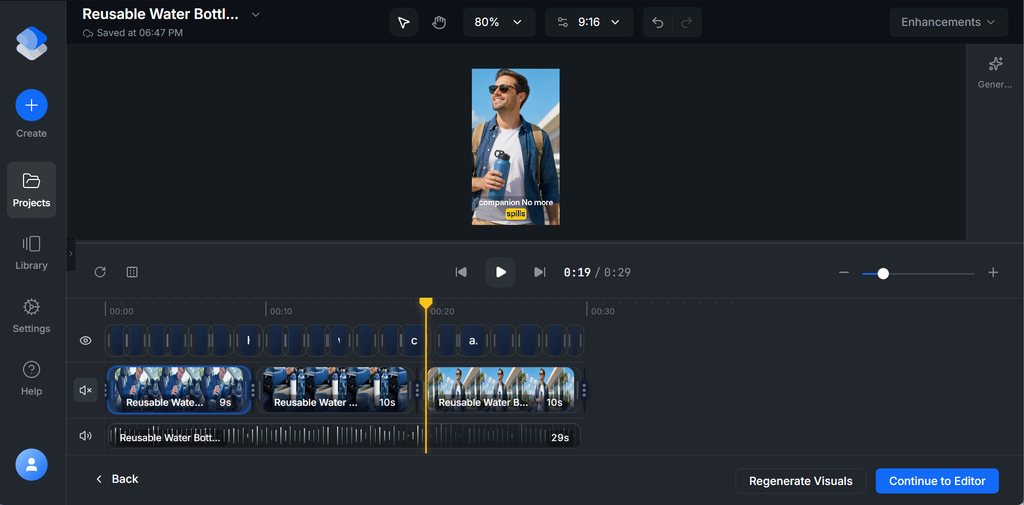
I recommend you review your video clip prompt scenes before clicking on “Generate Visuals”. This is the window where you make adjustments to make your video output fit your intended purpose.
Next, click on the “Continue to Editor” button for further video clip refinement.
4. Edit for clarity and pacing
Review the footage in sequence. Remove pauses that do not add context, but keep the moments viewers need in order to understand how the product works. Faster is not automatically better if the demonstration becomes difficult to follow.
1. Trim repeated explanations and shots that do not support the main message.
- On WayaFrame’s timeline editor, click on the specific clip you want to trim, and click the split tool. Drag the yellow-coloured strip to the section of the clip you want to trim and click on it.
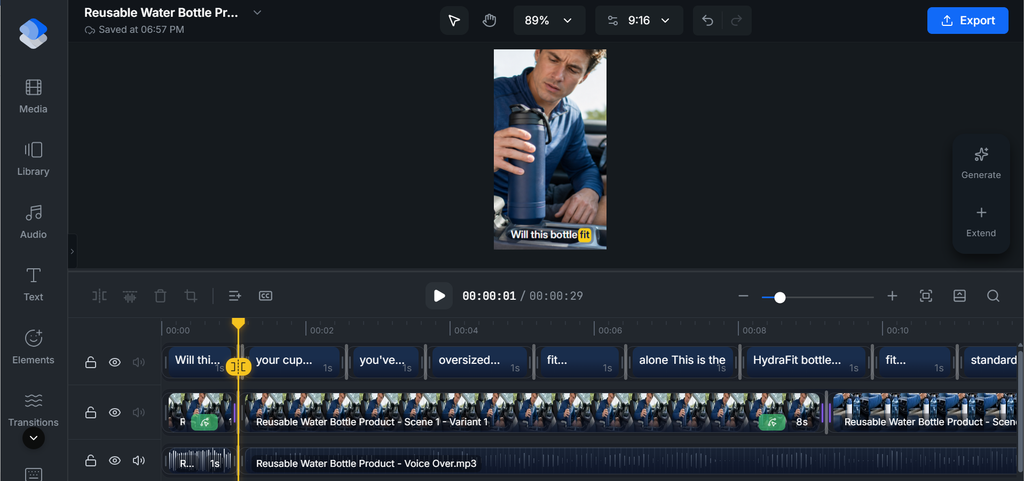
- This splits the clip from the rest of the clip, and you can delete that specific clip.
2. Keep important actions on screen long enough to understand.
This is the part where you adjust the pacing of your individual scene to ensure a key moment is sustained long enough for your audience to get the point.
Click on the clip you want to adjust the pacing, and select the “Basic” option on the right side of the clip. Scroll down to clip duration and adjust it to your preference.
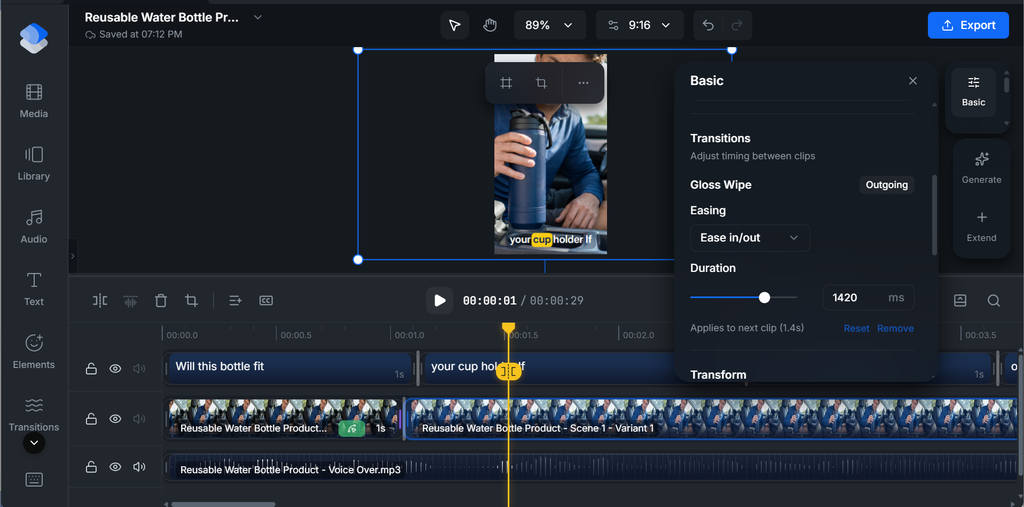
3. Use captions or concise text for key details, especially when narration carries essential information.
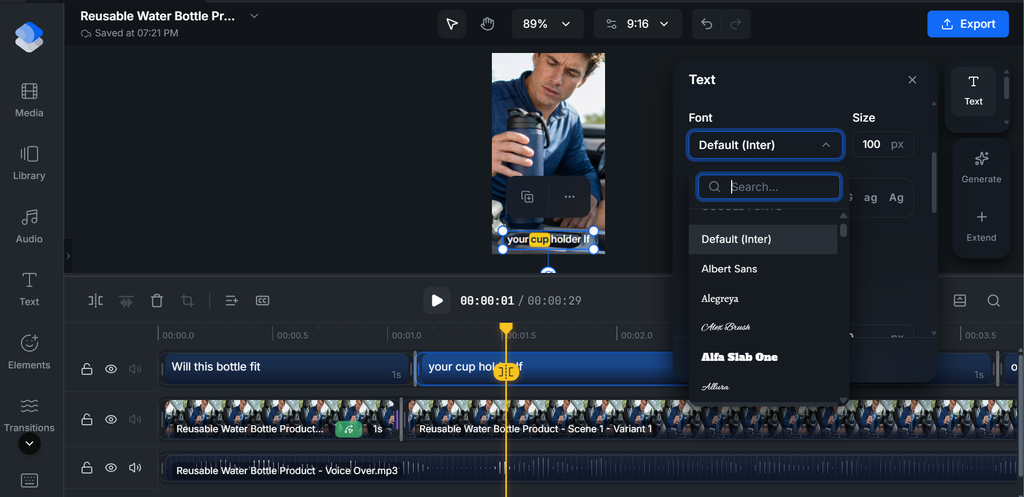
To edit your video clip caption on WayaFrame, click on the text on the timeline and select the tool “Text” on the right side of your dashboard.
This is where you modify your caption and text, including its font size, font style, highlight colour, padding, among other text editing features.
4. Check that music, effects, and transitions do not distract from the product.
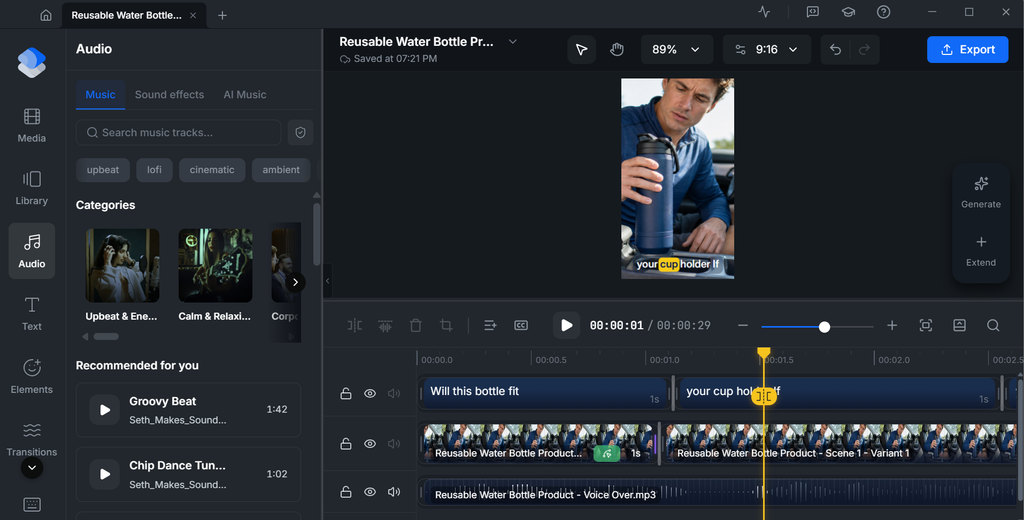
These features add more style to your product video scene. However, ensure they’re balanced and in synergy with the main product clip.
On the WayaFrame dashboard, you can access these features from the left-side icon on your timeline edit. Select the one that applies and drag it into your clip.
5. Watch the edit on a phone-sized screen and confirm that the product remains easy to see.
5. Close with a useful next step
A closing line should tell viewers what they can do next without manufacturing urgency. Depending on the offer, that might mean checking the product details, viewing available sizes, visiting the shop, or leaving a question.
Include price, discount, availability, or delivery information only when it is accurate and current. Make sure any spoken call to action, on-screen prompt, caption, and destination agree with one another.
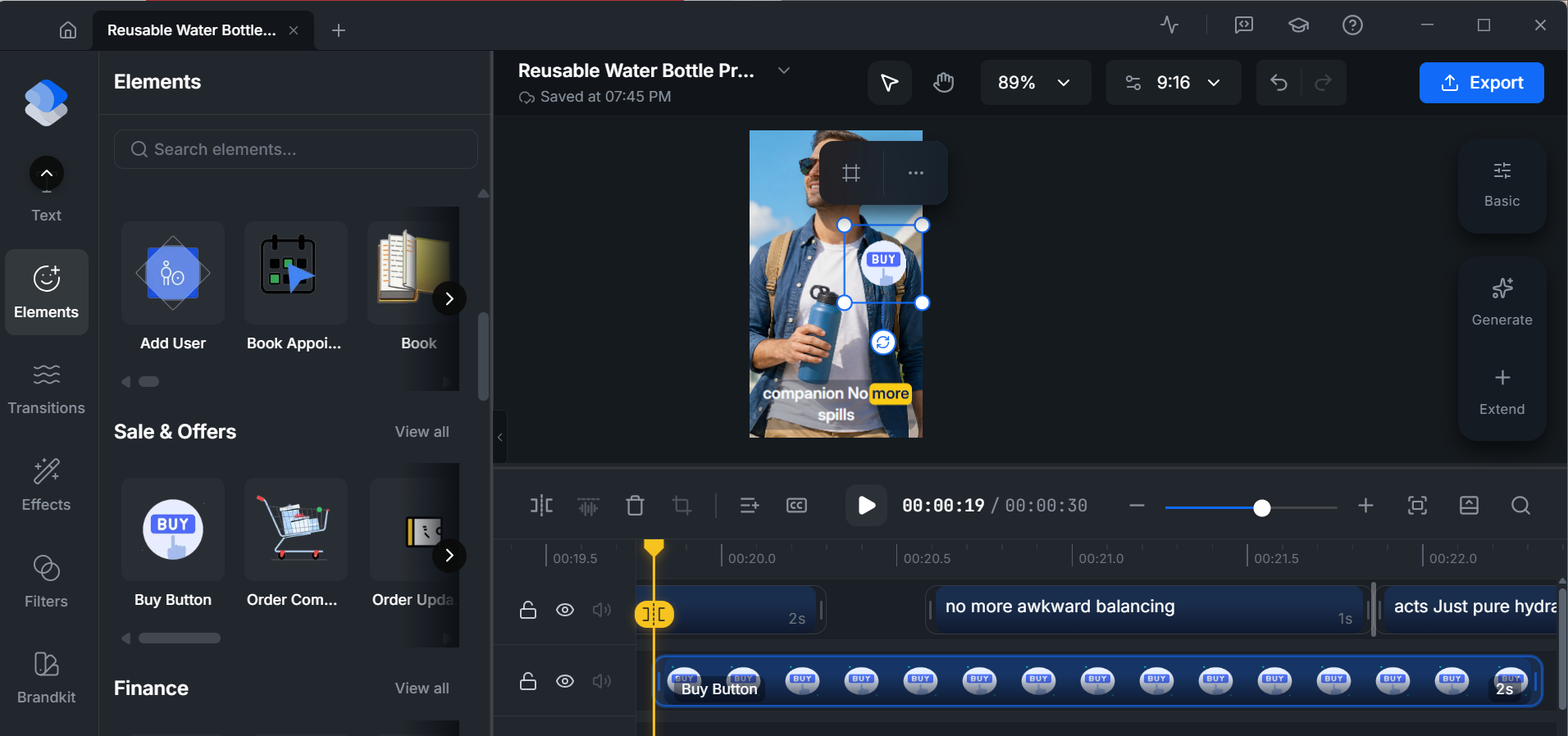
That said, you could add a call-to-action using the “Text” option or use the “Element option” on WayaFrame.
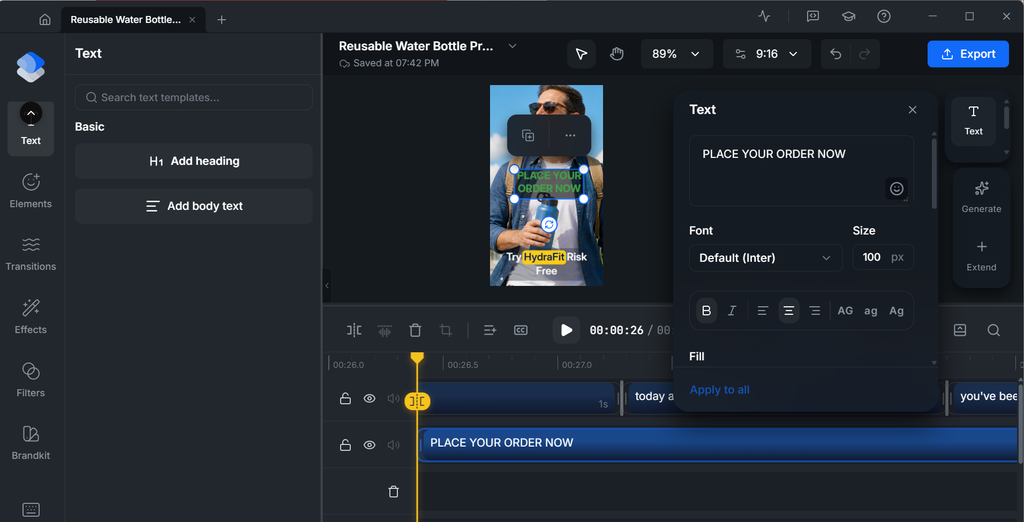
- The goal is to use the option that suits your video without appearing distracting.
Select your preferred aspect ratio and click the “Export” button to have your video downloaded.
TikTok uses a 9:16 vertical aspect ratio (1080 × 1920 pixels), while YouTube typically uses a 16:9 widescreen format, and many social media feed posts use a 1:1 square format.
How to Turn One Product Shoot Into Multiple Videos
One filming session can support several distinct videos if each version answers a different question. Repurposing should mean changing the editorial angle, not simply reposting the same cut with no new purpose.
- A quick teaser: show the product and one detail that invites a closer look.
- A step-by-step demo: explain how a feature works.
- A common-question video: answer one concern about fit, setup, care, or use.
- A context video: show the product in an everyday setting.
- A comparison: show two options or states side by side when the comparison is fair and accurate.
Keep a note of which shots answer which questions while filming. When making alternate edits, change one major element at a time, such as the opening, sequence, or call to action. This makes it easier to understand which creative choice may have affected the result.
8 TikTok Product Video Ideas to Try
Use these formats as starting points. Choose the one that best answers a real customer question and fits what you can show honestly.
- Unboxing: Show the packaging, what is included, and the first look at the product. Keep expectations realistic and do not imply that accessories are included if they are not.
- Problem and solution: Introduce a familiar problem, then demonstrate how the product is intended to help with it.
- Feature demonstration: Focus on one feature and show how it works in a close, easy-to-follow shot.
- Before and after: Use a fair comparison with consistent conditions. Explain what changed and avoid implying that one result is universal.
- Tips and use cases: Teach one useful way to use or care for the product.
- Day in the life: Show the product in an ordinary routine so viewers can understand its size, context, or convenience.
- Personalisation or custom order: Show the request, process, or finished item when relevant, while respecting customer privacy and permissions.
- Before you buy: Answer a common hesitation, such as sizing, material, setup, cleaning, or what comes in the box.
Frequently Asked Questions
A viral TikTok product video captures attention within the first two seconds and keeps viewers engaged until the end. The most successful videos combine a compelling hook, an authentic product demonstration, and a clear call to action that encourages viewers to buy, comment, or share.
The best TikTok product video ideas focus on showing the product in action rather than simply talking about it.
Popular formats include product demonstrations, before-and-after comparisons, unboxing videos, customer testimonials, problem-and-solution videos, “day in the life” content, and trending challenge adaptations.
Most high-performing TikTok product videos are between 15 and 60 seconds long. Shorter videos often achieve higher completion rates, which is an important ranking signal for TikTok’s algorithm.
That said, the ideal length depends on the complexity of your product. A simple product may only require 15–20 seconds, while products that need demonstrations or tutorials can benefit from videos lasting up to one minute. Regardless of length, every video should quickly introduce the product, demonstrate its benefits, and end with a clear call to action.
Successful e-commerce video marketing on TikTok is built around authenticity rather than polished advertising. Instead of creating commercial-style videos, brands should focus on storytelling, real customer experiences, product demonstrations, behind-the-scenes content, and educational tips that naturally feature their products.
Getting thousands of views without generating sales usually means the video attracts attention but doesn’t encourage viewers to take action.
Common reasons include a weak or missing call to action, failing to clearly demonstrate the product’s value, targeting the wrong audience, or making the video entertaining without explaining why someone should buy the product.
To improve conversions, ensure your videos clearly show how the product solves a problem, highlight its unique benefits, display pricing or promotions when appropriate, and tell viewers exactly what to do next—whether that’s visiting your TikTok Shop, clicking the link in your bio, or making a purchase.
Final Thoughts on TikTok Product Video Ideas
A video can rack up hundreds of thousands of views and still barely move the needle on sales if it never does the actual work of selling.
That comes down to a hook that earns the first two seconds, a middle section that proves the product rather than just describing it, and a close that makes buying feel like the obvious next step.
Hence, once you’ve planned your hook, product demonstration, and closing shot, bring those pieces into your editing workflow and refine the video before publishing. If you want to explore a connected workflow for creating and editing videos, take a look at WayaFrame.

