Skip to content

Last updated on April 25, 2026

How to Create Music

Tunedance turns your ideas into full songs. Write your own lyrics or let AI generate them, pick a genre and style, and produce a ready-to-use track in seconds.

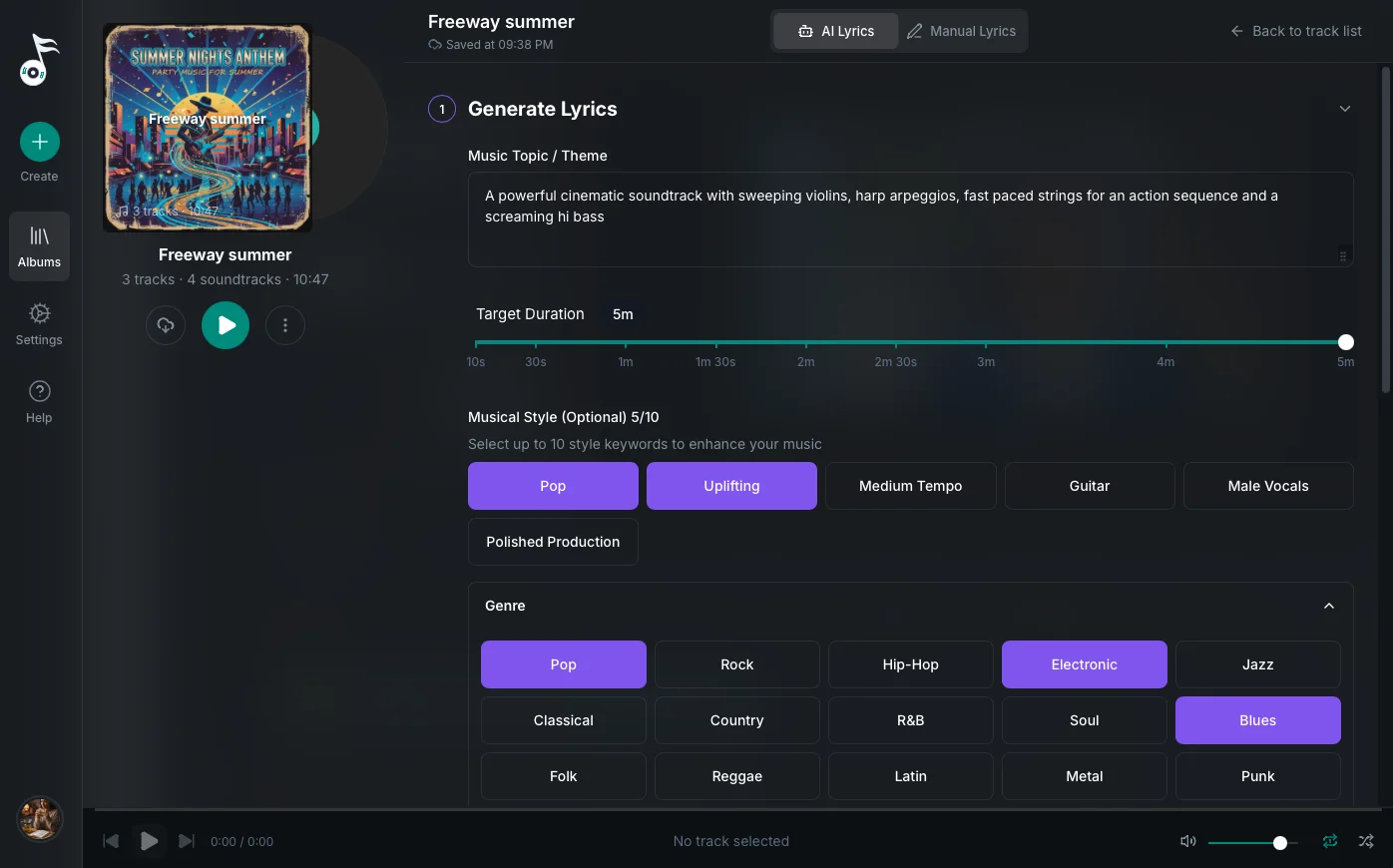
The music workspace

Create Your Lyrics

Open an album, click New Music, and choose how you want to create your lyrics.

AI Lyrics

Describe what the song should be about and Tunedance generates lyrics for you. You can add creative direction to guide the tone, imagery, or writing style, and choose which AI model to use. The generated lyrics appear in an editable text area so you can revise them before generating music.

Manual Lyrics

Write or paste your own lyrics directly. You can use section tags like [Intro], [Verse], [Chorus], [Bridge], and [Outro] to organize the structure. Each tag is color-coded in the editor for readability.

Set the Duration

Use the slider to set the target song length, from 10 seconds up to 5 minutes.

Style Enhancements

Style enhancements are keywords that shape both the lyrics and the final track. Select up to 10 across these categories:

  • Genre: Pop, Rock, Hip-Hop, Electronic, Jazz, Classical, Country, R&B, Soul, Blues, Folk, Reggae, Latin, Metal, Punk, Indie, Alternative, Funk, Gospel, Ambient
  • Mood: Uplifting, Melancholic, Energetic, Calm, Romantic, Dark, Joyful, Nostalgic, Dreamy, Intense, Playful, Mysterious, Hopeful, Aggressive, Peaceful, Dramatic, Inspirational, Somber
  • Tempo: Slow, Medium Tempo, Fast, Upbeat, Downtempo, Moderate Pace, Energetic Pace, Relaxed Tempo
  • Instruments: Guitar, Piano, Drums, Synthesizer, Strings, Brass, Bass, Violin, Saxophone, Flute, Acoustic Guitar, Electric Guitar, Keyboard, Percussion, Orchestra, Electronic Beats, Trumpet, Cello
  • Vocals: Male Vocals, Female Vocals, Choir, Harmonies, Rap, Smooth Vocals, Powerful Vocals, Soft Vocals, No Vocals, Instrumental, Vocal Runs, Ad-libs, Duet, Group Vocals
  • Production: Polished Production, Lo-fi, Acoustic, Electronic, Live Recording, Studio Quality, Raw, Layered, Minimalist, Rich Arrangement, Stripped Down, Heavily Produced, Vintage Sound, Modern Sound

Generate the Track

Click Generate Music to create the track. Tunedance generates the audio, creates artwork for the track and album cover, and starts playback automatically. The finished track appears in your album.

Edit an Existing Track

Click Edit on any track row to reopen the workspace with your lyrics, song title, and style pre-filled. You can modify any field and regenerate.

Wayaframe Help Center