Skip to content

Smart Motion

Smart Motion brings still images to life with a smooth pan and zoom effect. Enable it on any image clip and Wayaframe automatically animates the image from a starting position and zoom level to an ending position and zoom level over the clip's duration. It is the quickest way to get still images moving without setting up keyframes or using the full animation system.

This is ideal for turning photos, illustrations, screenshots, and AI-generated images into dynamic scenes that hold viewer attention.

Smart Motion

Enabling Smart Motion

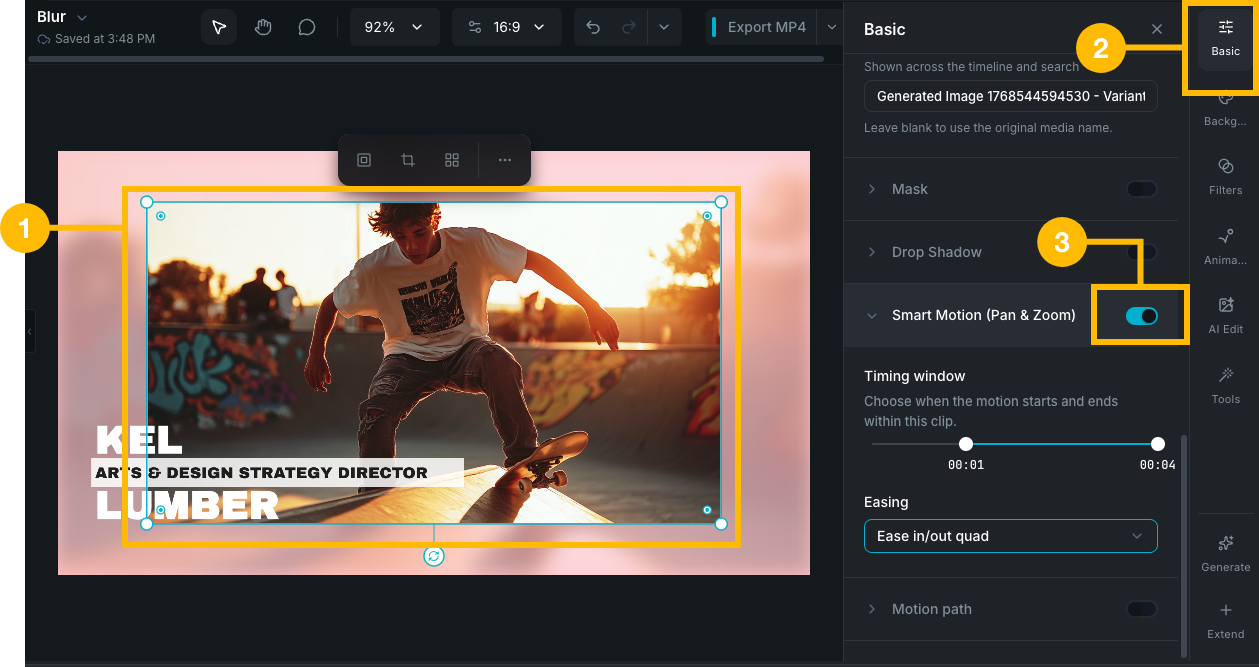
Select an image clip on the canvas or timeline, then find the Smart Motion (Pan & Zoom) section in the property panel and toggle it on. The effect is applied immediately and you can see the result by playing the timeline or scrubbing the playhead.

Smart Motion is only available on image clips.

What it does

When enabled, Smart Motion gently zooms into the image while panning across it, creating movement from a wider view to a closer view. The animation plays smoothly over the clip's full duration using a natural easing curve that starts and stops gradually.

Customizing the motion

Timing window

By default, the motion spans the entire clip from start to end. Use the timing window slider to change when the motion starts and ends within the clip:

  • Drag the left handle to delay the start of the motion.
  • Drag the right handle to end the motion before the clip finishes.
  • The portion of the clip outside the window stays static.

This is useful when you want the image to settle on a final frame or start from a still position before the motion begins.

Easing

Choose how the motion accelerates and decelerates:

  • Linear: constant speed throughout.
  • Ease In: starts slow, finishes fast.
  • Ease Out: starts fast, finishes slow.
  • Ease In-Out (default): slow at both ends with smooth speed in the middle. Creates the most natural-feeling motion.

When Smart Motion is unavailable

Smart Motion is automatically disabled and shows a reason if the clip has:

  • 3D rotation, skew, or perspective applied. Smart Motion and 3D transforms cannot be used together.
  • An existing transform animation. If the clip already has keyframed position, scale, or rotation animations, Smart Motion can't be applied on top of them.
  • A blend mode other than Normal. Non-standard blend modes conflict with the internal transform calculations.

Remove the conflicting setting to re-enable Smart Motion.

Interaction with clip changes

  • Trimming: if you trim the clip (change its start or end), the motion duration adjusts automatically.
  • Fit mode changes: if you change the clip's fit mode (fill, fit, blurred background), the motion is automatically recalculated to work with the new framing.

Wayaframe Help Center