Skip to content

Last updated on April 21, 2026

Using Transitions Between Clips

Transitions are visual effects that play when one clip ends and another begins, or at the start and end of a single clip. Wayaframe includes over 110 transition presets across 13 categories, from subtle crossfades to dramatic glitch effects.

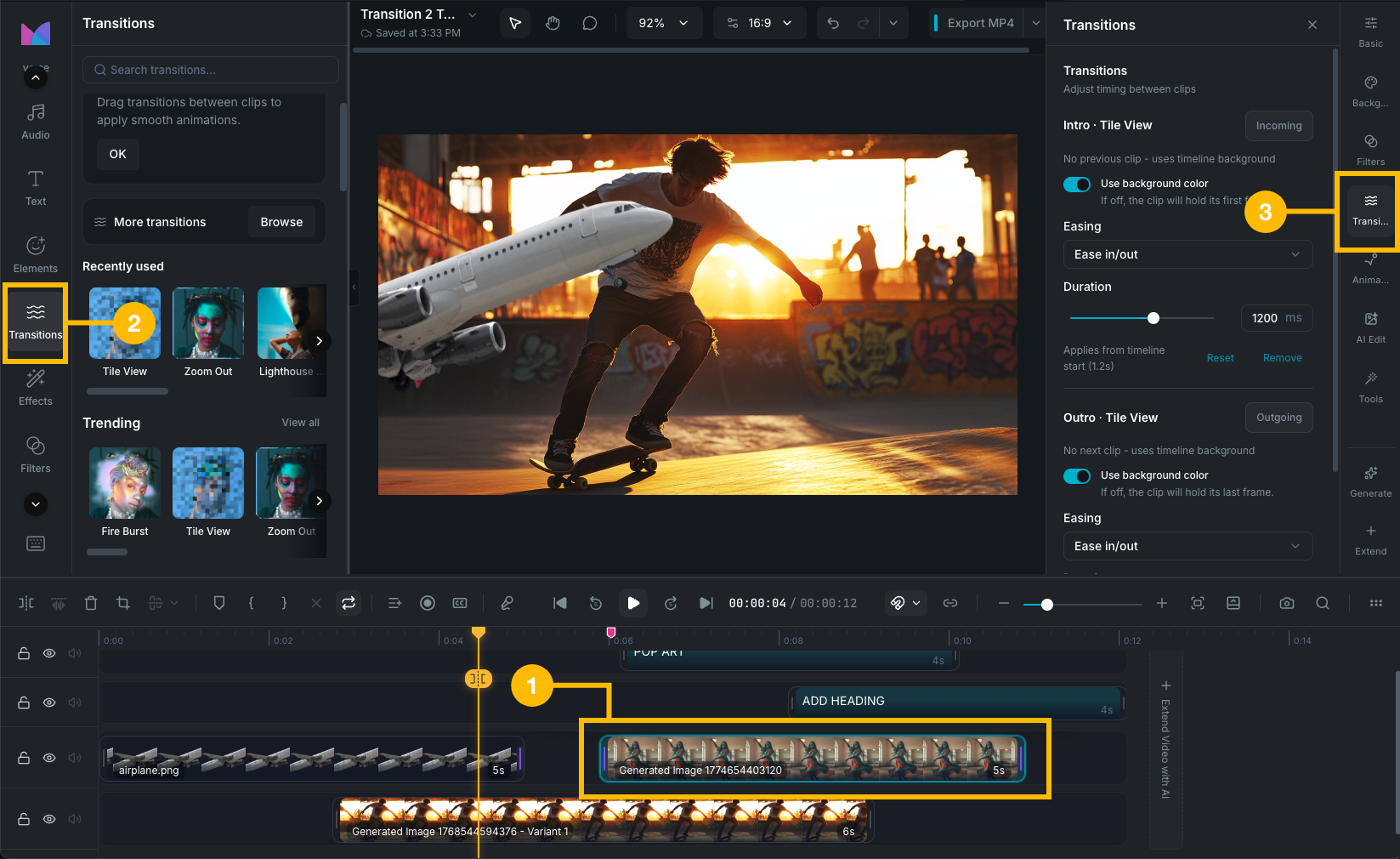
Transitions panel

Two types of transitions

Between-clip transitions

Applied between two adjacent clips on the same track. Both clips are visible during the transition as one fades out and the other fades in. The transition creates a brief overlap where both clips blend together.

Edge transitions (intro and outro)

Applied to the start or end of a single clip. An intro transition fades the clip in from the canvas background. An outro transition fades the clip out to the canvas background. These are used when a clip has no neighbor on one side, such as the first or last clip on a track.

A clip can have both an intro and an outro transition at the same time.

Browsing transitions

Open the Transitions tab in the editor's left sidebar to browse the transition library.

  • Search: type to filter transitions by name.
  • Recently used: your last-used transitions appear at the top for quick access.
  • Categories: transitions are organized into groups. Click a category to expand it.

Each preset has a thumbnail preview. Hover over a preset to see an animated preview.

Categories

  • Trending: popular presets like Fire Burst, Zoom Punch, Whip Pan, Beat Drop, and RGB Split.
  • Atmosphere: cinematic mood transitions like Fireworks Blast, Starry Mountain, and Arctic Flare.
  • Classic: traditional editorial transitions like Overlap Fade, Tilt Switch, and Vintage Frame.
  • Hits: high-impact cuts like Flash Cut, Snap Zoom, Glitch Jump, and Neon Pulse.
  • Overlay: layered effects like Checker Overlay, Fairy Snow, and Flare Overlay.
  • Light: light-based effects like Fireworks Flare, Laser Reflection, and Sunbeam Sweep.
  • Movement: motion-driven transitions like Quad Turns, Skyline Shift, and Bounce Drop.
  • Blur: soft focus transitions like Skewed Aperture, Soft Unfocus, and Telephoto Zoom.
  • Basic: clean structural transitions like Book Flip, Clean Crossfade, Page Curl, and Diamond Cascade.
  • Slide: directional push effects like Lightray Slide, Slice Jump, and Deck Swipe.
  • Mask: shape-masked reveals like Snowflake Mask, Ripple Ring, and Luminance Melt.
  • Glitch: digital distortion transitions like Multi Filter, Beyond Time, and Scanline Shift.
  • Distortion: warped effects like Oilpaint Rip, Wave Warp, Liquid Glass, and Morph Blend.

Supported clip types

Transitions work on these clip types:

  • Video clips (not audio-only)
  • Image clips
  • Text clips
  • Sticker clips
  • Chart and waveform effect clips

Audio-only clips and split-screen clips do not support transitions. Both clips in a between-clip transition must be on the same track.

Wayaframe Help Center