Skip to content

Generation Activity

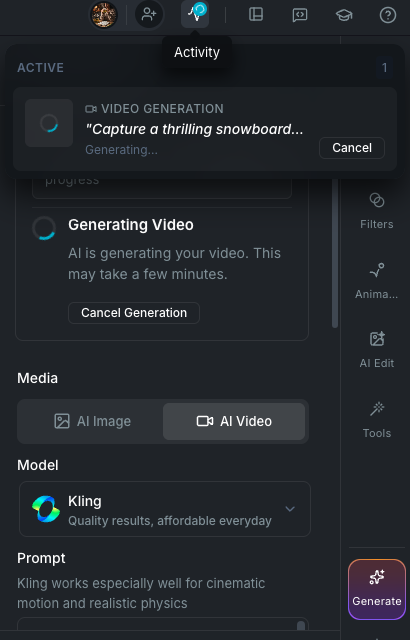
The Activity panel is a dropdown in the app titlebar that shows everything happening in the background: image generations, video generations, and exports. It tracks progress in real time, persists across app restarts, and gives you quick actions like cancelling, dismissing, or viewing completed results.

Generation Activity dropdown

Opening the Activity panel

Click the Activity icon in the titlebar. When jobs are running, a spinner appears on the icon so you know there is active work without opening the panel.

Job types

The Activity panel tracks three types of jobs:

  • Image Generation: AI image generation from any model (FLUX, GPT Image, Midjourney, Seedream, etc.), triggered from the editor, library, or Scene Director.
  • Video Generation: AI video generation from any provider (Runway, Luma Labs, Kling, Minimax, PixVerse, Vidu, Sora, Veo, WAN, Seedance, Grok, etc.), triggered from the editor, library, or Scene Director.
  • Export: video exports from the editor timeline, including progress stages (preparing, rendering, finalizing).

What each job shows

Every job card displays:

  • Thumbnail: a preview of the generated image or video. Active jobs show a spinner, failed jobs show an error icon, and video thumbnails display a play icon overlay.
  • Type label: IMAGE GENERATION, VIDEO GENERATION, or EXPORT, with a status icon.
  • Description: the prompt used for the generation (truncated if long) or the export filename.
  • Status: "Generating..." for active jobs, a time indicator (e.g. "5m ago") for completed jobs, or an error message for failed jobs.
  • Progress bar: export jobs show a 0 to 100% progress bar with the current stage.

Sections

Jobs are organized into three collapsible sections:

  1. Active: jobs that are currently pending, processing, or rendering.
  2. Completed: jobs that finished successfully.
  3. Failed / Cancelled: jobs that encountered an error or were cancelled by the user.

When no jobs exist, the panel shows an empty state with the message "No active jobs."

Actions

Cancel

Active jobs can be cancelled. Click the cancel button on any pending or in-progress job to stop it. For exports, this stops the rendering process. For video generations, this cancels the provider request.

View Media

Completed image and video generations have a View Media action that opens the result in the Media Details modal, where you can preview, download, or add it to a project.

Show in Folder

Completed exports have a Show in Folder action that reveals the exported file in your operating system's file explorer.

Dismiss

Remove a completed, failed, or cancelled job from the list. This cleans up the entry from the panel and its stored data.

Dismiss All Finished

A button at the bottom of the panel removes all non-active jobs at once. This clears completed, failed, and cancelled jobs in a single action.

Background processing

Generations continue running in the background while you work. You do not need to keep the Activity panel open or stay on the same page. Video generation jobs poll the provider for status updates automatically. When a job completes, the result is ready in the Activity panel and can be inserted into your project.

Jobs persist across app restarts. If you close and reopen Wayaframe, your active and recent jobs are restored from the local database. Jobs older than 24 hours with a terminal status (completed, failed, cancelled) are automatically cleaned up on startup.

Where jobs come from

Generation jobs are created automatically whenever you trigger a generation from:

  • The Generate panel in the editor (right sidebar)
  • The Edit panel in the inspector
  • The Scene Director during guided project creation
  • The Library AI Generate workspace
  • The Export workflow from the editor

Each job stores context about where it was started, so completed results can be routed back to the right place. For example, an image generated from the editor's Generate panel knows which track and position to insert into when the result is ready.

Wayaframe Documentation